How to Download Your Facebook Chat History for Safekeeping
Learn How to Download Your Facebook Chat History for Safekeeping that will be always there with you to analyze and portable to move from one storage to other. So have a look at the complete guide below to proceed.
You chat with your friends personally or inside the group on Facebook. Your conversation might go long enough and meanwhile, after some days of your regular conversation with the same friend FB pushes your back date conversation to below in the slide list. You might be willing to save that information inside the conversation that you have done a few days back. But as the Facebook has no direct option available to save up the conversation you will need to either collect screenshots or just scroll back again to view the conversation. We know that the users need this sort of functionality on Facebook that would help them danger their conversation pieces for further access. Hence we have found out the way to accomplish this feature on FB. The method has been written and described by is in this article. If you wish to utilize this function while on FB then you must read up on this article. Just go out and read up on the method now and you will be able to implement this in your Facebook account!
How to Download Your Facebook Chat History for Safekeeping
The method is quite simple and easy and you just need to follow the simple step by step guide that will help you to have all your chat data with you in a safe form and you can put it anywhere. So follow the below steps to proceed.
Steps to Download Your Facebook Chat History for Safekeeping:
#1 First of all, you need to log on to your Facebook account for which you wish to download the conversation’s data. You can open up the Facebook using any browser but prefer to use the best ones that are extremely capable.
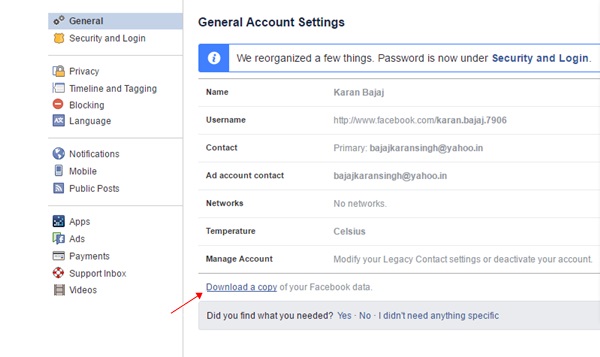
#2 Once you are successfully logged on to your Facebook account, you need to search for the General Settings option. Click on it and on the landing page that appears you will find the Link placed at the bottom. This link is aimed at downloading of all your Facebook days that includes photos, media, conversations etc. Click on the link so that you may proceed to download all your Facebook data.
#3 After completion of above step a new page will open up on your browser where you will notice the button “Download Archive“. Again you have to click on this button. It will take some time for the Facebook to analyze your conversations and Facebook data. Let out be done and after the completion, Facebook will inform you that whole of your data achieve link have been sent to the inbox.
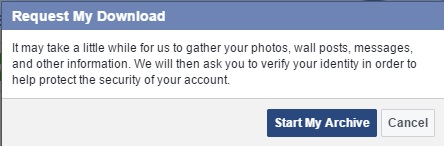
#4 Through the inbox open up the archive link. Click on the Start My Archive button and you will be asked to fill your FB password again. This is done for the security reasons so just fill it up. All your conversation and data will be then downloaded to the Zip file. You can access or anytime and hence surf through all your Facebook conversations!
#5 Through the above process all of the conversations are downloaded but of the user just wish to grab the part of conversations then it could also be done. For that, there is a Google Chrome extension that helps to grab only conversations and data for suggested days or weeks!’
You don’t require to be a tech geek or to grasp any advanced knowledge to induce the conversation saving feature in Facebook. This would be cleared to you after reading up the method described above. The process is although really simple but yet if any of the users collide with issues or struck in trouble then we could help them sort out the issues. They just need to write about their problems regarding this method in the comments box. Following to that we will find the fix for that issues and provide the solution right in the article!

![SmartPhone Ki Battery Life Kaise Save Karey [Top 5 Tips]](https://blogger.googleusercontent.com/img/b/R29vZ2xl/AVvXsEggEtUNDD4MokDYKfR-0xwO0OFqBBTuOh9P0No-TQwUjYMK9WGEazLOJz2rZlpp5Tpw1g74VIIqRv4HtLTj2gt1ErqDpR8pLadsJ4cDIMfrupvuEaLibgl2CmhsqNbdp3CkJugLlpfvuog/s72-c/Untitled.png "SmartPhone Ki Battery Life Kaise Save Karey [Top 5 Tips]")
 1. Alternatively referred to as a Real-Time Clock (RTC), Non-Volatile RAM (NVRAM) or CMOS RAM, CMOS is short for Complementary Metal-Oxide Semiconductor. CMOS is an on-board, battery powered semiconductor chip inside computers that stores information. This information ranges from the system time and date to system hardware settings for your computer. The picture shows an example of the most common CMOS coin cell battery (Panasonic CR 2032 3V) used to power the CMOS memory.